As promised, your Autorun Eater v2.4 parcel has arrived!
So what’s in the parcel?
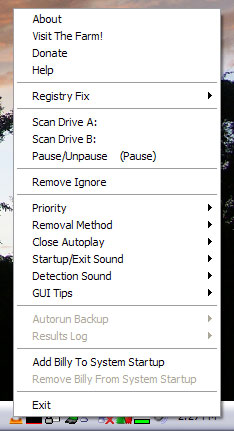
Added: ‘Close Autoplay’ option to prevent execution of malware via AutoPlay window.
Removed: ‘Scan Started… Right Click For Menu’ tray tip during launch.
Changed: aesettings.ini file, results.log file, and Autorun Backup folder relocated to application data folder for compatibility with Windows Vista & 7.
Changed: Improvements to monitoring engine.
Changed: Minor tweaks to program behaviour.
Changed: Minor tweaks to program GUI.
Changed: Minor tweaks to installer.
[Fixed]: Unable to ignore suspicious ‘autorun.inf’ with read-only attribute.
There were feedbacks that v2.3 settings could not be changed on Windows Vista & 7. This version should solve that problem and work as expected. When installing v2.4, it will automatically move the aesettings.ini file, results.log file and Autorun Backup folder from previous versions to the application data folder.
MD5 Checksum: efef09a6213bc6809da74a9e997233c8
If you Like this article please feel free comment and subscribe in my feed below.

 1 Comments
Nice work. keep it up.